Focused MVP scope before development
We reduce a broad AI idea into a first release with clear users, core workflow, review goals and budget limits.

AI idea to usable MVP
Build an AI-powered MVP with UX, Laravel, APIs, AI workflows, QA and launch support today.
Discover, prototype, build, launch
We help decide what to build first, how AI should help, and what can wait until real feedback.
AI-Enhanced MVP Development is for teams that have an AI product idea, but need help turning it into a focused first version people can actually use.
Kavita Systems does not start by adding a chatbot or model call to an unfinished idea. We first look at the customer problem, user roles, data, budget, timeline and the decision you need the MVP to answer. That keeps the first release practical instead of bloated.
Some ideas only need a prototype, a clickable workflow or a small technical proof before development. Others need a real web product with login, data storage, Laravel backend rules, frontend screens, selected AI feature, testing and deployment. We help choose the smallest version that can teach something useful.
The architecture is chosen after that discussion. A Laravel monolith may be enough for a first release. A decoupled, API-first, headless, Inertia or AI-oriented setup can make sense when the product needs separate frontend work, integrations, future mobile clients or more complex AI workflows.
The team can include UX/UI design, UX engineering, frontend, backend or full-stack development depending on the work. We use tools such as Laravel, Vue, React, Nuxt, Next, Inertia, TypeScript, Tailwind, databases, APIs, cloud services and AI providers only when they fit the product. AI-assisted tools can speed up research, prototyping and development work, but product judgement, architecture and QA stay with specialists.
Kavita Systems works best when an AI idea needs structure before development. We clarify the problem, users, data, risks, budget and first release, then connect UX/UI, frontend, backend, AI integration and launch support through visible milestones.
We reduce a broad AI idea into a first release with clear users, core workflow, review goals and budget limits.
Design, frontend, Laravel backend and AI planning stay connected, so fewer decisions are lost between stages.
We check data access, model limits, privacy, cost, fallback behavior and human review before AI goes live.
Laravel can manage users, roles, files, queues, prompts, logs and AI service rules in one backend layer.
Discovery, prototype, build, QA and launch can be split into visible milestones with owner review points.
After launch we help fix important issues, read early feedback and decide what belongs in the next release.
Scope, prototype, engineering, QA
AI MVP development is useful only when the first release can test a real product behavior, not just prove that a model can answer a prompt. We start by turning the idea into a workflow question: who uses it, what data they bring, what the system should produce, how the result is reviewed, and what the business needs to learn before spending more on the next version.
Discovery keeps the AI idea tied to a business decision. A founder may need a small product that proves one assisted workflow. A team with an internal process may need summaries, extraction, classification or support drafts inside existing roles and approvals. A company with an early prototype may need to replace fragile prompt calls with a Laravel-controlled backend, clearer data rules and screens that explain what users should do next.
The first scope should be narrow enough to teach something. We define the main user, the first task, the expected output, the review moment, the data that can be used and the edge cases that would make the release risky. Some ideas need only a prototype or technical proof before a full build. Others need login, accounts, files, queues, dashboards, provider calls, QA and deployment because the MVP must be used by real people.
UX work comes before model behavior. AI screens need more than a text box and a generated answer. We map loading states, empty states, weak output, edits, approvals, retries and audit trails. Figma helps make these states visible early. Figma Agents can help rethink outdated interface directions or compare rough alternatives, while Figma MCP can bring approved design context closer to Vue, React, Nuxt, Next or Inertia implementation. Human UX judgment still decides hierarchy, trust and user flow.
Architecture is selected around the release goal. A modular Laravel monolith can be enough when the first product needs accounts, roles, files, jobs, admin tools and provider calls in one controlled system. Inertia.js can keep Laravel product logic and interface work close together. A decoupled or API-first setup makes sense when separate frontend releases, mobile clients, partner integrations or public SEO pages are part of the plan. SSR, SSG, SPA, PWA-ready and real-time features are choices, not defaults.
Laravel gives the AI feature a safe backend boundary. The server can decide what a user may access, what context can be sent to OpenAI, Claude, Gemini or another provider, what should be stored, which jobs run in the background and when human review is required. Laravel AI SDK can help organize provider calls, actions and structured outputs when the feature belongs in the backend. MCP-compatible tools or agents are useful only when controlled tool access is part of the workflow.
Data planning decides how useful the MVP can become. A simple AI MVP may only need uploaded files, records, generated drafts and job status. A knowledge workflow may need retrieval, embeddings, source references and feedback. MySQL or PostgreSQL can handle many transactional products; Redis can support queues, cache and rate limits; BigQuery belongs in analytics-heavy cases. We avoid adding vector search, agents or complex infrastructure when a smaller data model can answer the first product question.
Development uses AI assistance with review, not blind automation. AI coding agents can inspect code, draft implementation steps, suggest tests or help refactor repeated patterns. Laravel Boost can improve framework context during backend work. These tools can reduce friction, but they do not decide product behavior, permissions, privacy rules, cost limits or architecture. Senior developers still check generated code, naming, edge cases, security, maintainability and fit with the existing codebase.
QA checks both software behavior and model behavior. We test roles, forms, uploads, API errors, mobile views, queues, failed jobs, deployment settings and recovery paths. For AI, we test realistic inputs, weak inputs, missing context, private data boundaries, output quality, review steps, logging and provider failures. AI-assisted tests can suggest more cases and regression paths, but release confidence still comes from product judgment and manual review of risky flows.
Launch is planned as the start of learning. We prepare environments, provider keys, limits, monitoring, release notes, support priorities and a way to collect feedback. After launch, prompts may need tuning, a review step may need simplification, a normal rule may replace an AI step, or a dashboard may need clearer states. The value of the MVP is evidence: where AI helps the workflow, what users trust, what costs too much and what should be built next.
Working with Kavita Systems stays visible. We usually begin with a project call, agree scope and milestones, track work, show demos, explain tradeoffs and prepare release care. The client does not need every low-level implementation detail, but they should understand decisions that affect budget, data, risk, support and future growth. The result should be an AI-assisted product path that can be handed off, improved or expanded without losing the reasoning behind the first build.
Practical tools for real releases. A focused mix of design, app frameworks, data tools, automation, hosting, and quality checks selected around each product.
Clarify the first useful workflow, target users, AI value, risks, budget limits and release scope before coding.
Shape Figma flows, UI states, forms, dashboards and responsive behavior around first users and real product logic.
Compare Laravel, Inertia, Nuxt, Next, API-first or headless options against the product goal and launch path.
Build Vue, React, Nuxt or Next screens with reusable components, responsive behavior and API-connected states.
Create auth, roles, product rules, APIs, queues, files, jobs, logs and service layers for the MVP workflow.
Plan prompts, retrieval, structured outputs, review states, automation limits and fallback behavior for users.
Prepare data sources, storage, permissions, document handling, audit trails and user roles before AI uses context.
Test flows, permissions, AI output, errors, deployment, monitoring and feedback loops before the first release.
Some work is public, while many long-term client systems remain private under NDA.
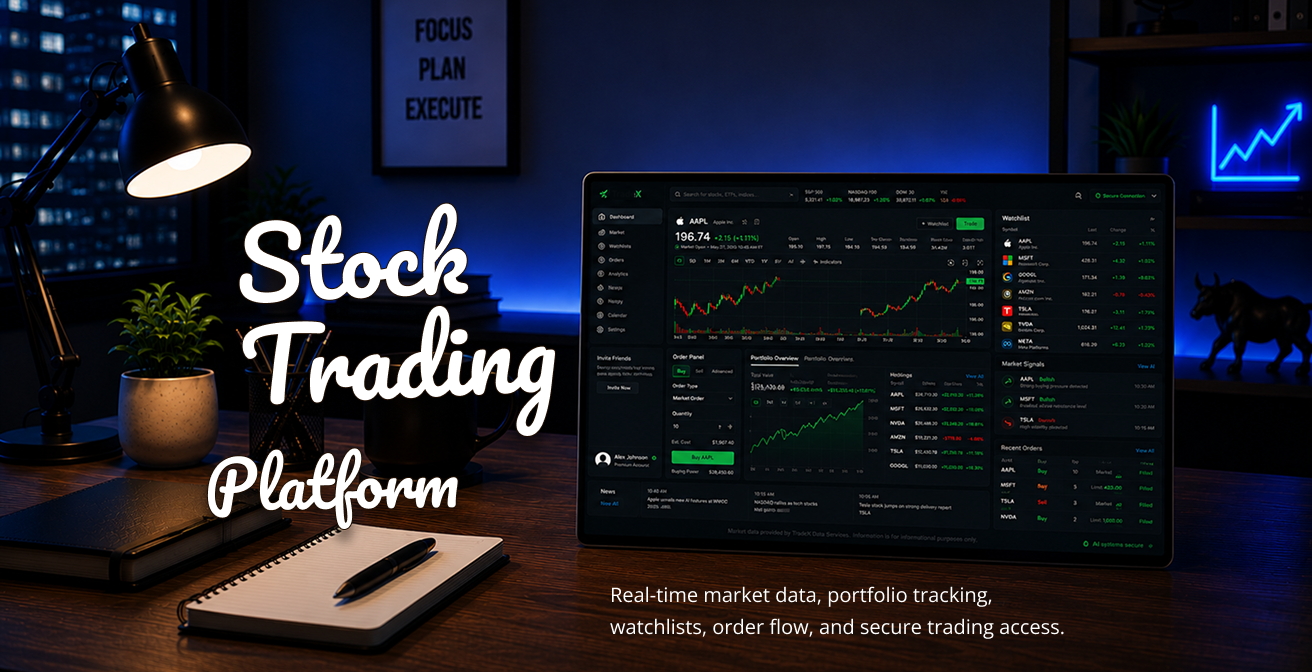
Years active: 2025 - in progress
Stock trading platform for buying and selling shares with real-time market data, portfolio tracking and secure account workflows.
Key points: live quotes, order flow, watchlists, market signals, portfolio analytics, user dashboards, transaction history and security-focused access.
Yes. You do not need a full specification, finished design, or technical plan before we talk. We can start with the idea itself: what problem it should solve, who will use it, what data it may need, where AI could help, and what the first version should prove. From there, we shape the idea into a clear MVP scope, user flow, prototype direction, and development plan that can be reviewed before deeper work begins.
We look for the smallest useful version of the product. That usually means one clear user group, one or two core workflows, and only the AI features needed to test the idea. Login, roles, data storage, admin tools, integrations, or AI review steps can be included when they are part of the real workflow. The goal is not to build everything at once. The goal is to launch a focused version that can teach something from real users.
In many cases, yes. A prototype helps everyone see the product before time goes into backend logic and AI integration. It can show main screens, user actions, form behavior, review steps, empty states, errors, and responsive layouts. This is especially useful for AI products, because the workflow often matters more than the model itself. Sometimes a Figma prototype is enough, and sometimes we also need a small technical proof of concept.
We can build chat interfaces, but not every AI MVP should be just a chatbot. AI can also help with document processing, smart search, data extraction, summaries, classification, internal assistants, content review, workflow automation, recommendations, and draft generation. The important question is where AI actually saves time, improves a decision, or makes the product more useful. That is where we focus first.
Then we will say that. Sometimes normal search, rules-based logic, filters, templates, or automation can solve the problem better than AI. AI adds cost, testing, privacy questions, unclear edge cases, and support decisions, so it should earn its place in the product. A good MVP is not the one with the most AI. It is the one that helps users solve the problem clearly and gives the business useful feedback.
Yes, and for many MVPs this is the safest approach. AI can prepare a draft, summary, category, answer, extracted data, or suggested next step. Then a person can review, edit, approve, reject, or send it. This works well when accuracy matters, when data is sensitive, or when the product is still learning what good output looks like. Human review can make the first release safer without blocking the value of AI.
We look at this before development starts, not after. We map what data the product uses, who can access it, what is sent to an AI provider, what is stored, what is logged, and what should never leave the system. We also plan user roles, permissions, fallback behavior, and review steps. For AI products, privacy is part of the product architecture. It is not a checkbox added at the end, because it shapes how the MVP should work.
It depends on the product. Some MVPs need OpenAI, Claude, Gemini, embeddings, vector search, document search, structured outputs, or a mix of tools. Some need a simple model call. Others need a more controlled AI workflow with prompts, queues, logs, retries, and human review. We choose the setup around the product goal, data, budget, response quality, and future maintenance, not only because one provider is popular.
Laravel is a strong fit when the AI feature needs a real product around it. Most AI MVPs need more than a prompt. They need users, roles, files, dashboards, admin tools, APIs, jobs, queues, logs, notifications, billing, permissions, and safe backend rules. Laravel gives the product a controlled backend layer, so AI can become part of a reliable workflow instead of a disconnected experiment that is hard to support later.
Yes. Many AI products need to work with existing systems from the start. That might include CRMs, ERPs, spreadsheets, document storage, payment tools, internal databases, third-party APIs, marketplaces, email platforms, or private knowledge bases. Before building, we define what data comes from where, which system is the source of truth, how updates happen, and what should happen if an integration fails.
We test both the product and the AI behavior. For the product, we check user flows, forms, roles, permissions, integrations, loading states, errors, mobile behavior, and deployment setup. For AI, we check sample inputs, bad inputs, edge cases, output quality, review steps, fallback behavior, token usage, logging, and cost risks. AI does not need to be perfect in an MVP, but it needs to be safe enough and useful enough for release.
It depends on how much needs to be real in the first version. A clickable prototype or technical proof of concept can be much faster than a full MVP with login, dashboards, backend logic, AI workflows, data storage, integrations, QA, and launch support. We usually start by defining the first useful scope. After that, it is much easier to estimate time, budget, milestones, and what can wait for the next release.
After launch, the real learning starts. We can help review user feedback, fix release issues, improve AI prompts, adjust workflows, add missing screens, improve data handling, connect more integrations, or plan the next product version. The first MVP should give you clarity: what users actually need, where AI helps, what needs improvement, and what is worth building next, so the second release is based on evidence, not guesses.
Hourly Rate
Senior talent by role.
Specialists
Matched to your project.
Tracked Hours
Verified Upwork history.
Earned on Upwork
Trusted since 2015.